
Pricing & Usage
RRSMB software is billed on AWS Marketplace as hourly consumption. You pay only for Windows SMB shares connected to EFS, plus mounted EFS storage — not per cluster node. Standard AWS EFS charges are billed separately by AWS.
Billed as ShareHours — one unit per share on EFS each hour. Delete a share in the Admin UI to stop accruing for that share on the next hourly billing tick.

Billed as ManagedStorageGBHours. Standard AWS EFS storage and access charges apply separately.
Node count
Dual-AZ production clusters are configurable from 2 to 8 nodes (9-16 is Experimental). The Eval Kit is a fixed 2-node single-AZ deployment for evaluation and non-HA use only. Marketplace fees above apply per connected share and mounted storage — not per node.
The TCO point that holds: Elastic Throughput
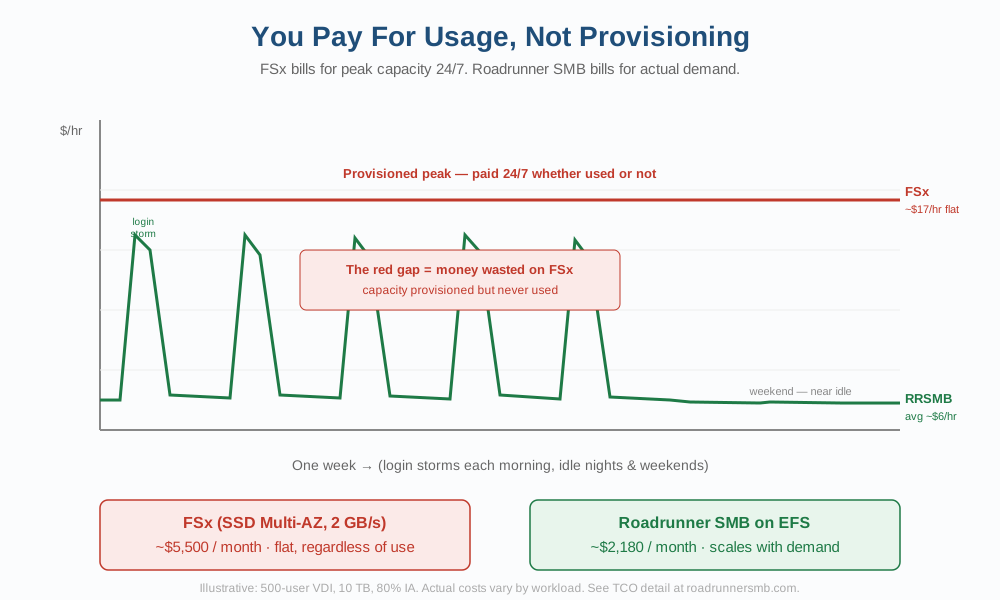
Morning login storms need a burst of backend throughput. FSx for Windows bills a provisioned throughput tier 24x7. Roadrunner SMB on Amazon EFS Elastic Throughput follows that storm and the quiet hours after it. That is the durable savings mechanism - not a 40-60% claim across every configuration.
Elastic storage and Infrequent Access
Amazon EFS Lifecycle Management can move eligible files into Infrequent Access automatically while users keep the same SMB shares. That is elastic storage with automatic IA for idle data - an Amazon EFS capability in your account. Configuration options are too wide for a single comparative savings claim. See Product & Architecture for performance, stability, flexibility, and active-active scale-out.
Stop permanently
Delete the CloudFormation stack when finished evaluating or decommissioning. Software charges stop; your files remain in Amazon EFS in your account. Unsubscribe from the Marketplace listing if you no longer need the product.
Charges appear on your AWS bill under AWS Marketplace as hourly consumption.
Low-risk to try
Hourly metered billing on AWS Marketplace — run only the shares and storage you need. Scale to 0 to pause with zero software charges, or delete the stack when you are done.