
Evaluating Windows storage architectures?
Amazon FSx for Windows File Server is AWS's native managed SMB service - a strong fit when you need deep Windows-native features and a fully AWS-managed file system. Roadrunner SMB is an EFS-backed Marketplace appliance in your VPC, designed around login-storm performance, predictable saturation behavior, flexibility, active-active scale-out, and elastic storage with automatic Infrequent Access.
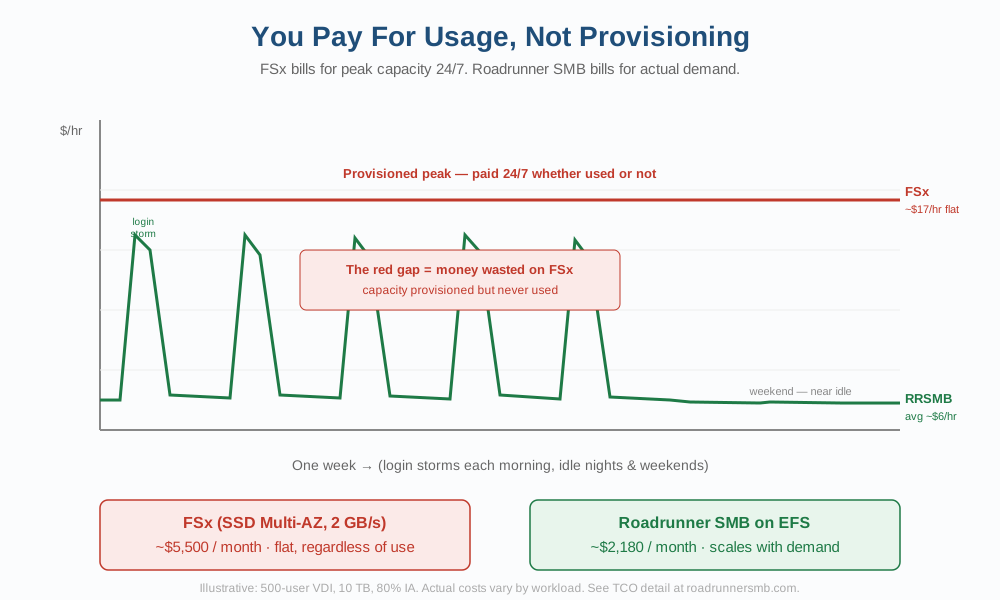
Configuration options are too wide for a single 40-60% savings claim. The TCO point that holds is narrower and more durable: Elastic Throughput during the morning login storm versus 24x7 provisioned throughput.
Elastic Throughput for the login storm - not 24x7 provisioned peak
VDI demand is not a flat line. Hundreds or thousands of FSLogix logins arrive in a short Monday-morning window, then the estate is much quieter overnight and on weekends.
FSx for Windows File Server bills a provisioned throughput tier 24x7, sized for that peak whether the estate is in a storm or idle. Roadrunner SMB uses Amazon EFS Elastic Throughput, so backend throughput follows the login storm and falls when demand falls. You are not required to keep a peak-sized storage-throughput floor running all week.
That is the one TCO story we stand behind. Share count, Region, instance mix, and data layout still change the bill - do not treat the chart as a quote or an SLO.
Where the architectures differ
FSx for Windows typically combines dedicated Windows file-system capacity with provisioned throughput. That model fits steady, Windows-native estates. VDI login storms, long-lived corporate shares, and data that grows cold over years ask a different question: can serving capacity scale independently of storage, and can idle files stay in the same namespace?
Roadrunner SMB puts clustered SMB in front of Amazon EFS. Add active-active Dual-AZ nodes as demand grows without repartitioning the EFS data estate. Amazon EFS Elastic Throughput follows workload demand instead of a fixed storage-throughput tier. EFS Lifecycle Management can move eligible files to Infrequent Access automatically.
Roadrunner SMB vs. FSx for Windows
Both deliver managed SMB on AWS with Active Directory and Windows ACL semantics.
| Dimension | Roadrunner SMB | FSx for Windows |
|---|---|---|
| Storage foundation | Your Amazon EFS (elastic, multi-AZ) | Managed FSx storage |
| Scale-out | Active-active Dual-AZ nodes (2-8 production); serving independent of storage | AWS-managed capacity model |
| VDI / FSLogix | Login-storm engineering: L1 plus DynamoDB metadata, 8-channel mux, admission | Provisioned throughput tiers |
| Saturation behavior | STATUS_SERVER_UNAVAILABLE after a short hold; existing sessions stay up | AWS-managed service behavior |
| Aging file data | EFS Lifecycle / Infrequent Access in the same SMB namespace | FSx storage-class and capacity choices |
| Deployment | AWS Marketplace + CloudFormation in your VPC | AWS managed service |
| Billing model | Hourly ShareHours + ManagedStorageGBHours (Marketplace) | FSx capacity + throughput pricing |
| Pause / dev-test | Scale ASG to 0 - RRSMB software charges stop while offline | FSx capacity charges continue for provisioned storage |
| Linux on same dataset | Same EFS data over NFS and SMB | SMB-focused; separate storage for Linux NFS workloads |
| Data exit | Standard files remain in your EFS if you remove the appliance | FSx-managed volume lifecycle |
| Deep Windows-native features | See Known Limitations (VSS, DFS-R, etc.) | Native Windows Server feature set (VSS, dedupe, DFS, etc.) |
Workloads requiring VSS, DFS replication, or other deep Windows-native SMB features may be better served by FSx for Windows or self-managed Windows file servers - see Known Limitations.
Architecture in depth
The 1.3 architecture whitepaper covers Elastic SMB metadata, login-scale hardening, cluster HA, identity, billing dimensions, and deployment topology.
Not coming from FSx?
Self-managed Windows file servers on EC2 → · DIY Samba on EFS →
Evaluate Roadrunner SMB on Amazon EFS
Subscribe on AWS Marketplace, launch into your VPC, and compare the architecture to your current Windows file service. Most teams reach a first SMB share in about 30 minutes.