Download Architecture Whitepaper (PDF)
Predictable. Simpler. Scalable.
One SMB platform for FSLogix profiles, user shares, and corporate file storage - engineered for login storms and designed to scale without storage sharding.
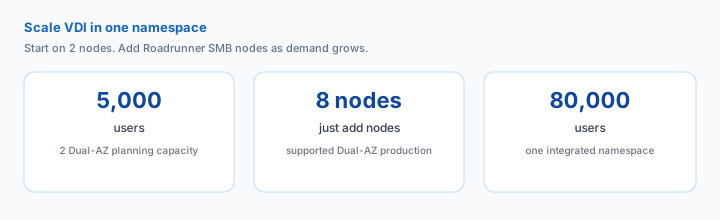
A 2-node Dual-AZ deployment provides planning capacity for up to 5,000 VDI users. Scale to as many as 8 production nodes, with planning capacity up to 80,000 users in a single integrated namespace.
Login and profile storage
VDI login and reconnect storms create concentrated, write-heavy, metadata-intensive demand. Storage that performs well during normal desktop use can struggle when thousands of users arrive at once.
Roadrunner is engineered for that moment.
Corporate and departmental file storage
File shares grow for years. As conventional file-server environments expand, capacity and performance limits can lead to more file systems, more namespaces, and more decisions about where users and data belong.
Roadrunner serves both workloads through one AD-integrated SMB fabric over Amazon EFS.
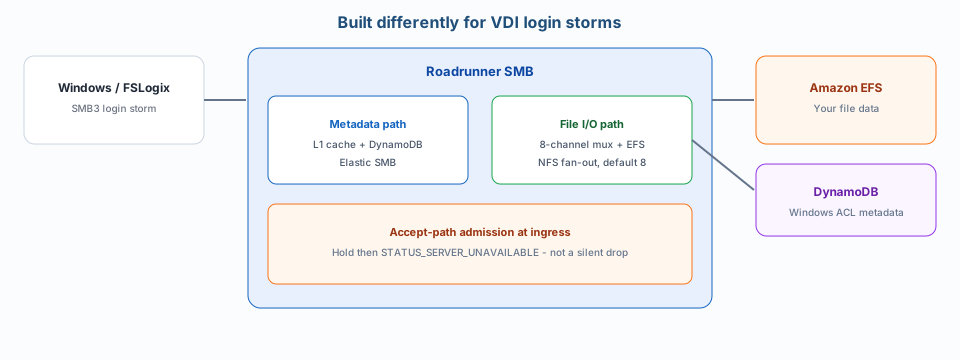
Windows and FSLogix create concentrated bursts of connections, metadata operations, and writes during login and reconnect events. Roadrunner SMB was designed around that workload.
Hot Windows ACL metadata is served from an L1 memory cache, with authoritative state maintained in Amazon DynamoDB. File I/O runs through an 8-channel NFS mux to Amazon EFS. When a serving node reaches capacity, admission control returns a clean SMB-level retry response instead of allowing new connections to destabilize existing sessions.
Conventional Windows file-server environments can require additional file systems as capacity and workload demands grow.
Roadrunner separates SMB serving capacity from persistent storage. Add active Roadrunner nodes as demand grows while Amazon EFS remains the common storage layer - without requiring you to repartition the EFS data estate.
No user-to-file-server placement strategy. No growing collection of storage islands.
Dual-AZ production supports 2-8 nodes. Configurations of 9-16 nodes remain Experimental.
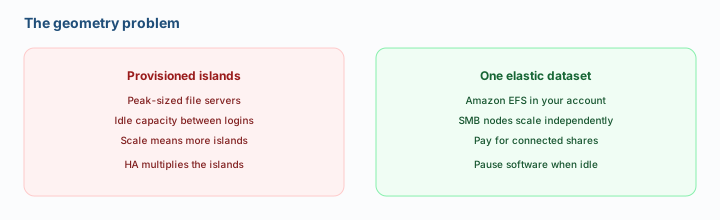
High-performance profile storage and long-lived corporate file shares place very different demands on infrastructure.
Traditional VDI environments may solve them with separate storage systems.
Roadrunner SMB serves:
FSLogix profiles + home directories + departmental shares + corporate file storage
through the same AD-integrated SMB fabric over Amazon EFS.
Fewer storage systems. Fewer namespaces. Fewer scaling decisions.
VDI storage demand is highly uneven. Login and reconnect periods create sharp peaks, followed by much quieter periods of normal desktop activity.
Roadrunner uses Amazon EFS Elastic Throughput so backend throughput rises and falls with workload demand instead of requiring Roadrunner to maintain a fixed storage-throughput tier.
The storage architecture adapts to the workload instead of being sized around its daily peak.
Departmental and corporate file shares accumulate data for years. Much of it becomes infrequently accessed long before the business is ready to delete it.
Amazon EFS Lifecycle Management can automatically move eligible files into Infrequent Access and other lifecycle storage classes while users continue accessing the same SMB shares.
No archival file-server tier. No namespace migration. No change for users.
Files remain in Amazon EFS in your AWS account.
Eval Kit administration is protected by CloudFront, ALB, and AWS WAF. Dual-AZ production administration remains private to your network through VPN, Direct Connect, a jump host, or equivalent controls. SMB traffic remains private behind an NLB in both deployment tiers.
Remove Roadrunner and the files remain yours in EFS.
Deploy Roadrunner SMB in your AWS account in about 20 minutes and connect your first Windows share.
Evaluation use only. Usage charges apply. The Eval Kit automatically uninstalls after 30 days.
Typical default Eval Kit AWS infrastructure is about $1/hour at us-east-1 list (as of 2026-09-01), plus $0.10 per connected share-hour. Actual AWS charges vary.